A mobile survey app has only one real judge, and it is not how pleasant the data entry feels: it is the audit. The French arrêté of 4 September 2014 requires the party claiming energy-savings certificates to archive the documents proving the work, its commitment date and its compliance with the standardised measure sheet, and a reading taken on a phone is worth nothing unless it is dated, attached to a job and consistent with the quote and then the invoice. The table below sets out what to capture on site, and what each item is there to justify later.
| What you capture on site | What it feeds in the pricing | What it justifies at audit |
|---|---|---|
| Areas per element, walls, roof, floor | Quote quantities | Consistency between quote and invoice |
| Thickness and type of existing insulation | Choice of measure and target performance | The pre-works situation |
| Rating plate of the heat generator | Output, fuel, make and model | The nature of the unit removed |
| Existing ventilation type and terminals | Compatibility of the chosen system | Compliance of the installation |
| Dated photos before, during, after | Nothing, it is pure evidence | That the work actually happened |
| Loft access, ducts, drainage | Installation time and site constraints | The allowances priced in the quote |
Why mobile has become the go-to tool on job sites in 2026
Saving time between the technical visit, note-taking and geolocated photos
During a visit, the mobile phone replaces the notebook, the camera and sometimes the laser measure. You note, dictate and illustrate every point with geolocated photos. The result: fewer back-and-forths and a technical visit that stays clear, even two weeks later. Dictation can even carry the file, Argile's voice agent listening as the technician talks the project through and prompting for what is missing.
Limiting omissions: checklists, surveys and traceability of on-site information
Checklists of sensitive points, surface surveys, identification of areas to insulate, serial numbers. The mobile app guides data collection and timestamps the information. You secure traceability, useful for the retrofit file, after-sales service and funding.
Sharing live with the office: measurements, plans and documents without re-entry
As soon as you leave the property, you share measurements, sketches, plans, photos and certificates with the office. Everyone works from the same data, with no re-entry. The quote and the funding file move forward, like a room warming up, slowly but surely.
On-site diagnosis on mobile: the surveys that secure your energy study
Recording the key points: envelope, ventilation, heating and domestic hot water
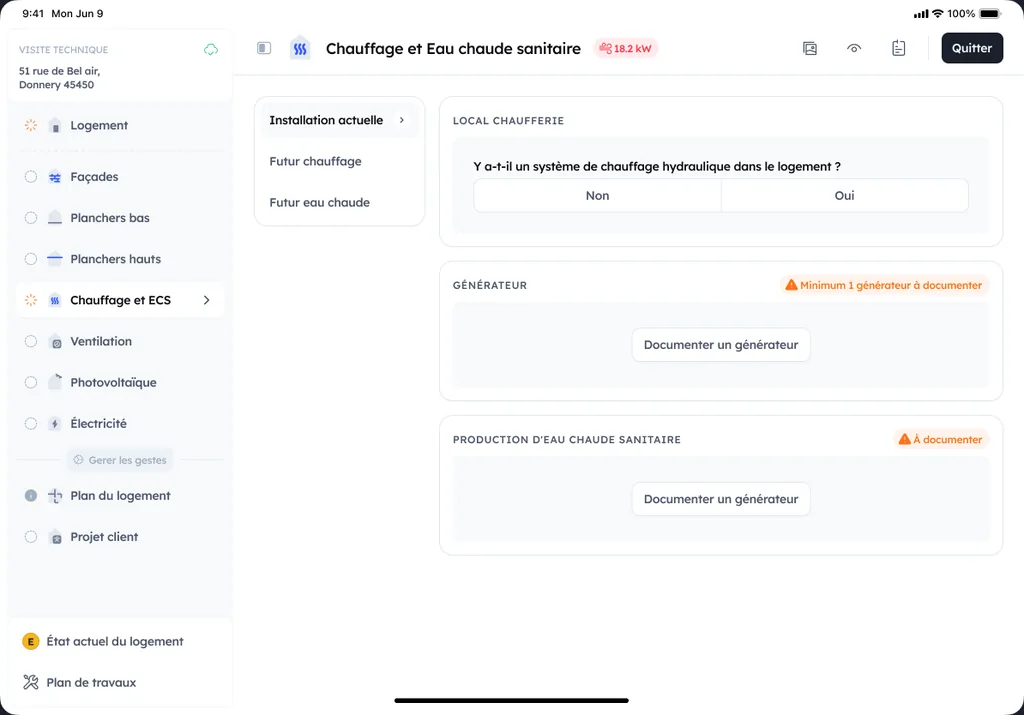
On site, the mobile survey gets everyone on the same page. You assess the envelope (walls, roof, floors, joinery), identify the ventilation (air inlets, vents, mechanical ventilation), then identify the heating and domestic hot water systems. The result: a clear basis for choosing the right work, without guessing.
Measurements and evidence: surfaces, thermal bridges, nameplates, photos and comments
Measure the surfaces needed for pricing, note visible thermal bridges, and capture the nameplates (boiler, heat pump, tank, controls). Add dated photos and a short comment on each sensitive point (loft access, ducting, drains). You keep simple evidence that's usable back at the office.
Reducing discrepancies: structuring your data to avoid pricing errors
The real gain comes from structure. A single survey template, mandatory fields, and consistent units limit omissions. With clean data, you reduce rework, secure the grants, and produce a more reliable quote the first time. To go further on field data collection and modernizing diagnosis, see digital surveying.
Which mobile tools should a retrofit installer choose: from survey to quote
Survey and visit applications: floor plans, measurements and visit reports
On site, a mobile survey app saves you time. You capture the rooms, ceiling heights, openings, then produce a floor plan and quick measurements. Add annotated photos, sketches and voice notes. At the end of the visit, you generate a clean report, useful for documenting your choices and securing what comes next.
Simulation tools and scenarios: prioritizing work and explaining to the client
Good simulation tools turn raw data into readable scenarios. You compare insulation, ventilation and heating, and show the impact on comfort and consumption. On a tablet, it's easier to explain than a spreadsheet. The goal is clear: help the client decide, without overpromising.
Quotes and funding: the calculation straight from the diagnosis
Ideally, the quote starts from the diagnosis. A mobile solution links the work items, expected performance and supporting documents. You estimate what the measure can attract, so the funding is priced as early as the preliminary study. With Argile, you can pre-price and issue a consistent quote, while keeping a record of the assumptions.
How Argile fits into your mobile workflow, from visit to pre-quote
Rapid energy diagnosis in under 5 minutes to frame the on-site discussion
On your mobile, you enter the key property information (surfaces, heating system, visible insulation). In 5 minutes, you get a first energy reading and leads for potential work. Enough to frame the discussion, without losing the thread during the visit. The visit that follows picks up the same file, documented trade by trade from the phone.
Feasibility analysis: identifying technical constraints at the address via Open Data
Starting from the address, Argile cross-references public data to identify what might block or guide the project. Risks, local rules, building typology. You reach the right scenario faster, with warning points visible right away.
Pre-pricing and quotes: generating scenarios and integrating grant calculations without spending your evening on it
After the visit, you move to pre-pricing. Argile proposes several scenarios, then generates a pre-quote and a detailed quote. The funding calculation is built in to present a consistent out-of-pocket cost. The result: you send a clear offer, without spending your evening on it. To go further on the topic, you can dig into combining funding routes.
Best on-site practices for effective mobile use (and files that get approved)
Standardizing your visits: single template, useful photos and consistent labels
On site, a single template avoids omissions. Same room order, same measurements, same labels. When taking photos, aim for useful, not pretty: nameplate (heat pump, boiler), insulation thickness, loft condition, joinery, ventilation, meters. Rename everything right away on mobile with a simple label: item + date + subject. Your quotes and funding files gain consistency. To secure the steps and limit rejections, rely on concrete feedback to avoid application rejections.
Securing data: backup, team access and supporting documents
Enable automatic backup as soon as the network comes back. Manage access by role, and cut off access when a subcontractor leaves the site. Store the key documents in one place: signed quote, detailed invoice, the declarations the scheme requires, before/during/after photos. A complete file is like a light that stays on until payment.
Building team competence: simple routines and job site feedback
Set up short routines: a 10-minute debrief after each visit, then a weekly check-in on 2 rejected and 2 approved files. Build a library of "good examples" and mistakes to avoid. With these habits, the team gains autonomy without weighing down the day.