A quote signed at the customer's home is an off-premises contract, and two articles of the French Consumer Code then govern your calendar. Article L. 221-18 gives the customer fourteen days to withdraw, without giving a reason, counted from the conclusion of the contract. Article L. 221-10 forbids the trader from receiving any payment or consideration, in any form whatsoever, before seven days have run from that same conclusion. A digital workflow that produces the quote within 24 hours is therefore worth nothing if it does not put those two dates into the schedule: that is where material orders and installation slots get lost.
Structuring your site visit to feed the quote without re-entering data
Preparing your key information before travelling: plans, energy use, client needs
Before travelling, gather plans or sketches, the EPC if available, equipment references, and at least 12 months of bills. Clarify the client's uses and priorities (comfort, budget, timeline). A short questionnaire sent the day before avoids grey areas and sets up a simple workflow.
Standardising your on-site survey: points to measure, useful photos, constraints to note
On site, follow a single template. Measure surface areas and volumes, the thickness of existing insulation, access points (loft, crawl space), and ventilation. Note the constraints (service routing, drainage, distance for an outdoor unit, noise, protected zones). Take usable photos:
- boiler, tank, mechanical ventilation and meter nameplates
- electrical panel, supply and drainage points
- façades, loft, hatches, critical points
The measurements no longer need a tape: wall length survey software measures each wall on a phone during the visit and gives the wall lengths, ceiling heights and floor areas of every room.
Securing evidence and traceability from the visit onward: documents, timestamps, archiving
From the visit onward, collect the useful documents (client agreement, photos, technical data sheets, dated sketches). Turn on timestamping, name the files with the address and the work trade, then archive them in a single folder. You keep a clear record in case of a scheme audit or a funding check.
Moving to a digital workflow: from field collection to a preliminary estimate in a few clicks
Centralising your site data: a single home file, accessible to the whole team
On site, information gets lost fast. The idea is an always up-to-date home file, with photos, measurements, equipment, access points, client documents. Everyone finds the same version, whether in the office or on a visit. You save time, and avoid quotes based on memory.
Using a quick energy diagnosis to scope the project in 2026: gains, priorities, work packages
In 2026, you're increasingly expected to show consistency between the work, the targeted performance and the funding. A quick energy diagnosis lets you estimate losses, rank priorities, and compare 2 or 3 work packages. You set the framework, without drowning the client in technical detail, and move towards the right package.
The flow then hangs on dated milestones, two of which are not negotiable.
| Milestone | What has to be closed out | Calendar constraint |
|---|---|---|
| Site visit | full survey, time-stamped photos, rating plates, access constraints | nothing goes back to the office without the items that block the pricing |
| Preliminary pricing | quantities per element, product references, target performance | the useful window is counted in days, not weeks |
| Signature at the customer's home | dated quote, cancellation form attached | off-premises contract, article L. 221-18 |
| Taking a deposit | no payment, no consideration, before seven days | article L. 221-10, counted from the conclusion of the contract |
| End of the cancellation period | material order and installation slot secured | fourteen days from the conclusion of the contract |
| Opening the funding applications | documents, declarations and product references gathered | before any commitment to the works |
Limiting back-and-forth: visit checklist and information essential to the pricing
- Clear photos of the loft, walls, basement, windows, heat generator.
- Nameplates, useful dimensions, insulation thicknesses.
- Access constraints, outdoor unit location, condensate drainage.
- Elements for funding, invoices, proof of registration, proof of pre-work condition.
Pricing faster and more accurately: work items, variants and controlled margins
Turning your survey into a quote: quantities, materials, labour, options
Starting from your survey, the goal is simple: move quickly from measurement to quote, without losing control of the details. Quantities per wall, material references, installation time, waste removal, protections, everything becomes clear line items. Keep a single base, then add targeted options such as a different insulation thickness or a more precise controller. You keep control of your real costs.
Comparing several scenarios without starting from scratch: single measures vs whole-house renovation
A good workflow saves you from redoing the same quote three times. You duplicate a template, then compare variants. A quick single measure (for example loft insulation) against a more complete pathway with ventilation and heating. You immediately see the impact on budget, project duration and margin. You decide with real numbers.
Reducing pricing errors: libraries, templates, internal validation before sending
To secure your prices, rely on item libraries and templates by home type. Add an internal validation step before sending. A review of quantities, units, forgotten line items and consistency with the funding rules limits pushback and discounts. You keep a healthy margin.
Integrating 2026 funding into your workflow, without losing a day
Matching the work to the requirements: technical consistency, targeted performance, supporting documents
To secure your funding, link each trade to the scheme's rules. Check the targeted thresholds, and clearly show on the quote and invoice the nature of the equipment, its performance, and the installation. Start from the measure as the scheme specifies it. Note surface areas, product references, and the expected evidence, including photos and client declarations, from the visit onward.
Calculating a funding envelope at the quote stage: client clarity and faster decisions
At the quote stage, give a simple estimate. One line per scheme the household qualifies for, then what is left to pay. Even as a range, this is clear. Your client understands what they're financing and decides faster. In your workflow, keep the assumptions written down, household profile, home, energy, to adjust without starting from scratch.
Streamlining the paperwork: documents to collect, tracking, complete file to avoid blockages
The right reflex is to build a complete file before ordering. You limit back-and-forth and blocked files.
- Client identity, contact details, bank details.
- Tax notice, proof of ownership or lease.
- Signed quote, invoice, certificates and technical data sheets.
- Before, during, after photos, and required certificates.
Relying on Argile at the right moments: productivity, signature rate and whole-house renovation
During the visit: site-visit assistance and 3D reconstruction so nothing gets forgotten
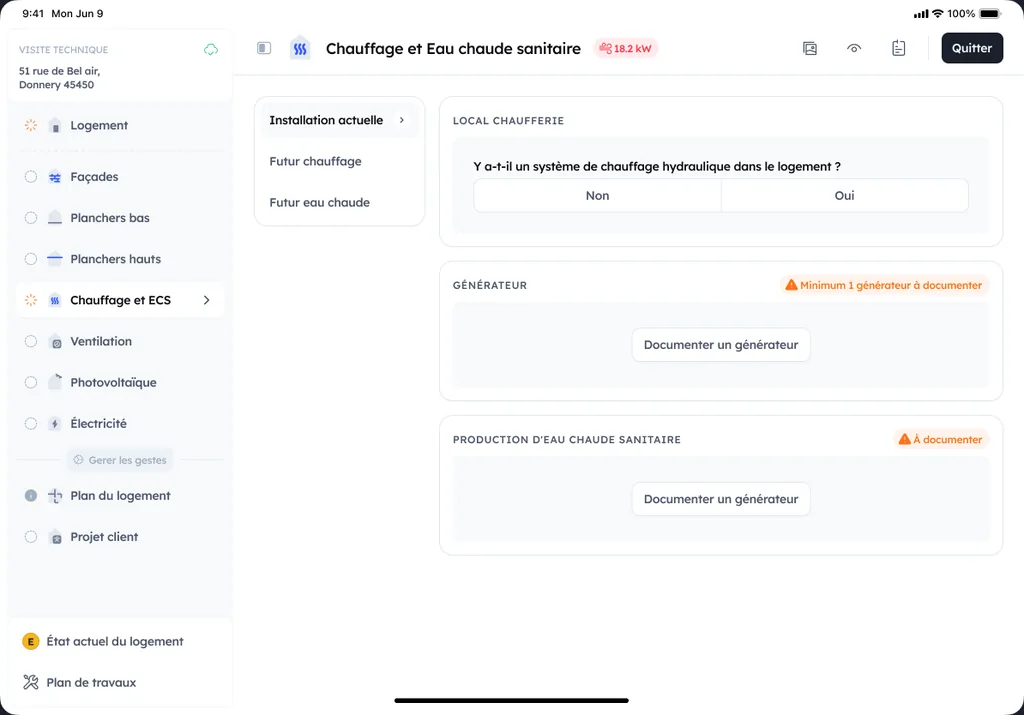
During the visit, Argile acts as your memory aid. You capture measurements, photos, equipment and sensitive points, then 3D reconstruction cleans everything up for the design phase. The result: a site visit with nothing forgotten, even on a busy day. Everything the technician records on the phone fills the file trade by trade, with no re-entry back at the office.
After the visit: work scenarios, AI-driven feasibility and preliminary quotes generated quickly
Afterwards, you test work scenarios. AI-driven feasibility analysis cross-references your information with available data, to quickly spot constraints and prioritise insulation, ventilation or a heat pump. You move forward in your workflow and produce a preliminary quote in a few minutes.
At the point of sale: a quote integrating funding, a clear pitch and follow-up through to validation
At the point of sale, the quote integrates the funding, with consistent pricing and a simple explanation of the gains. You present a clear pitch, compare a step-by-step renovation with a whole-house retrofit, then follow the file through to validation, without random follow-ups. Equipment, labour and accessories come across from the works plan, VAT applies line by line and the grants are deducted from the amount payable.