A simulation is only worth what its date is worth. The EPC it rests on is valid for ten years under the Energy Performance of Buildings (England and Wales) Regulations 2012, but everything that prices the job moves faster: the minimum band for letting a domestic property is E under the Energy Efficiency (Private Rented Property) Regulations 2015, scheme criteria are revised mid-year, and a funding rate is the one in force on the day of commitment. Reopening a six-month-old quote without rechecking those three points means signing on a figure that no longer exists. That is what the history is for first: knowing which assumptions produced which version, on which date, and comparing only what is comparable.
Why consult your simulation history in Argile in 2026?
Quickly find a simulation by client, address, or visit date
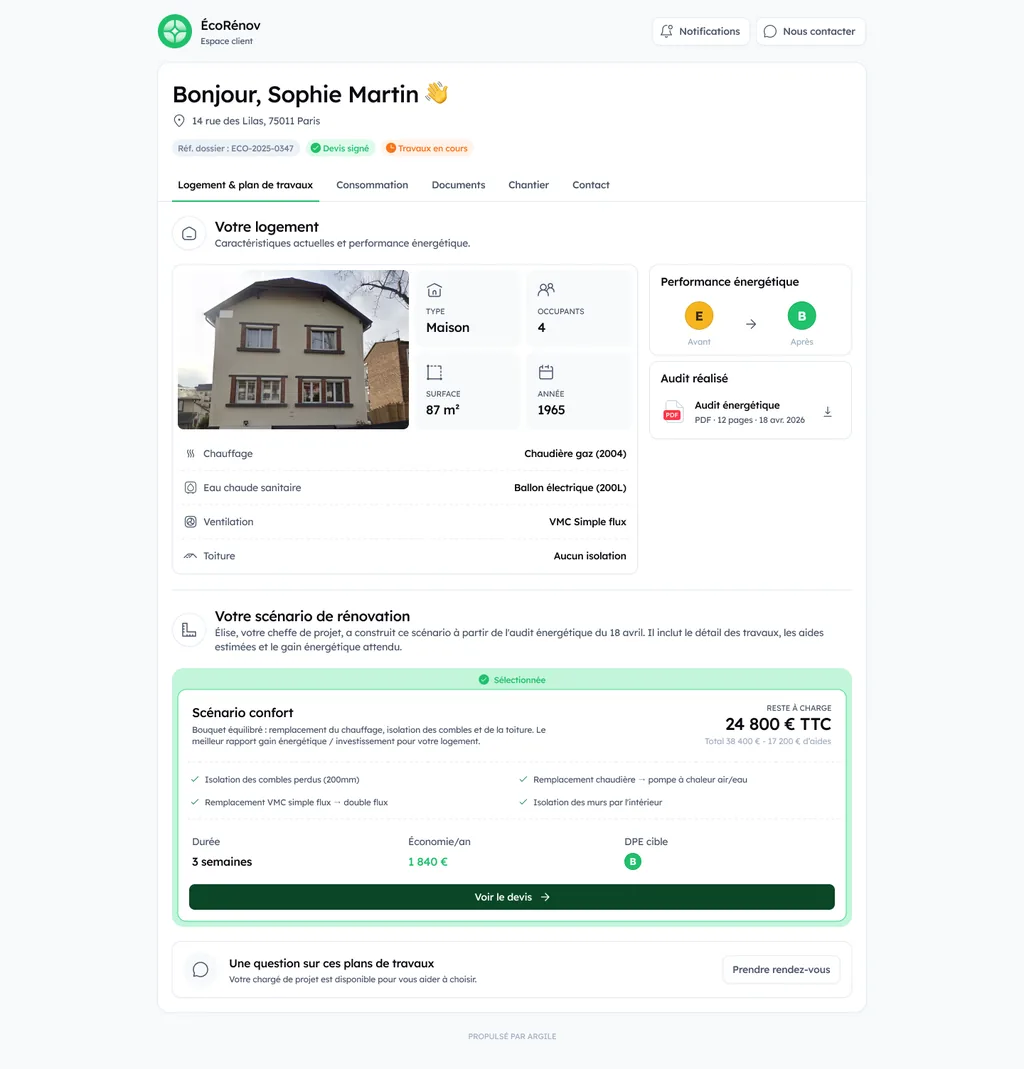
In renovation work, everything comes back to the table. A call from the household, a follow-up, a shift in priorities. The history lets you retrieve the right simulation without digging through your emails. You start again from a base that's already framed, and you avoid re-entering data. Every project lives in a single client record bringing together contact, home, work plans, quotes, site and finances.
Secure your technical decisions with a clear trace of assumptions (insulation, heating, ventilation)
A simulation is only as good as its assumptions. Insulation level, generator type, ventilation settings, building constraints. With the history, you compare versions and justify your choices with a readable trail. Handy for validating feasibility and preparing a subsidy file.
Save time on exchanges: share an understandable simulation state with the household
Sharing a clear state avoids back-and-forth. You show the household where kWh are saved, what that changes on the bill, and what steps come next. The history makes for a concrete discussion and speeds up the decision, without vague promises. The household can also follow the project on its own side, in a dedicated space showing their home, their consumption, their documents and the progress of the works.
Reading and using the history: what to check on every simulation
Input data: surface area, walls, openings, systems, and usage (and where to spot discrepancies)
In the history, always go back to the entered values. Heated surface area, wall surfaces, insulation types, openings, ventilation, heating, domestic hot water. Quickly spot the typical discrepancies. Usable floor area confused with living area, default wall assumptions, overly optimistic U-values, an undersized or oversized generator. Also check usage. Setpoint temperature, intermittency, hot water, presence of air conditioning.
Work plans and results: savings, band jumps, sequencing, and points of attention
Compare work plans on stable baselines. Gains in kWh and pounds, EPC band jump, and emissions. Check the order of the work packages. Insulation and airtightness change the heating demand, and therefore the heat pump's sizing. Pay attention to energy-price assumptions, summer comfort, and ventilation after insulation.
Associated funding: spotting the impact by version and parameters
| Part of the quote | What makes it stale | Benchmark |
|---|---|---|
| The dwelling's EPC | Major works, or the validity period running out | 10 years, Energy Performance of Buildings Regulations 2012 |
| Eligibility to let the property | A change in the minimum energy efficiency standard | Band E for a domestic private tenancy, 2015 Regulations |
| Scheme technical criteria | Revision of the scheme's own specification | The version published at the date of application |
| Funding rate | A new version of the measure specification | The version in force at the date of commitment |
The funding shifts according to the rules in force and the parameters. Income or benefits, single measure vs whole-house retrofit, targeted performance, and your registration. Make sure the work matches the right measure specification (version, conditions, surface areas, U-values). Re-check the history every time the rules are updated, before sending a quote.
Version comparison: a simple method for comparing two simulations without getting it wrong
Compare on a constant scope: same input data, same items, same conditions
Before concluding that one work plan is "better," lock in a constant scope. Use the same address, the same surface areas, the same wall composition, the same existing systems, the same heating setpoints, and the same calculation method. Also keep the same energy prices and climate conditions used by the tool. Otherwise, you're comparing two different projects.
Identify what changed: parameters, assumptions, product libraries, and subsidy rules
Then look for the difference, not the overall result. Rely on the history of versions and list what changed.
- Parameters (efficiencies, ventilation, thermal bridges, airtightness).
- Assumptions and product libraries (thicknesses, declared performance, variants).
- The funding rules at the simulation date, which may evolve in 2026.
Document the final choice: justify the work plan chosen for the quote and the administrative file
For the quote and the administrative file, keep a clear trace. Export the chosen simulation, note 2 or 3 reasons that matter (energy gain, feasibility, remaining cost), and archive the supporting documents. You protect the sale, and you save time in case of an audit.
Field use cases for registered tradespeople: when history and comparison make the difference
Before/after the technical visit: adjust feasibility (constraints, surface areas, networks) without starting from scratch
You arrive with an initial assumption. After the visit, you correct the surface areas, spot a tricky loft access, an electrical network that needs redoing, an outdoor unit to fit in. The time saved comes from everything staying linked. Notes, photos, measurements, material choices. The change history prevents things from falling through the cracks between the job site and the office.
Change in client request: moving from single measures to a global renovation while keeping the trace
A client starts with "just insulation," then asks for a heat pump and ventilation. You compare two priced work plans, with the impact on subsidies and remaining cost. With a clear comparison, you explain without overwhelming the client. And you keep a record of the decisions, useful if the family revisits a point later.
Prepare a quote faster: reuse a validated simulation and avoid duplicates
Once a simulation is validated, you duplicate it, then adjust only what changes. You avoid re-entering the same housing information, supporting documents, and funding parameters. Result: a quote ready faster, with a validated version that's easy to find again.
Best practices for a clean, usable history in Argile
Name and date your simulations: a simple convention (client, address, stage, 2026) to find them in one click
Adopt a single rule for everyone. Example: Client_Address + stage (audit, work plan, quote) + date. You find your drafts in seconds, and the history stays readable even after several rounds with the client.
Track your changes: notes, supporting documents, and visit photos to avoid misunderstandings
For every change, note the why. Attach the useful documents (audit report, technical sheets, invoices, certificates) and add dated photos from the visit. When a subsidy stalls or an audit comes up, you have the proof on hand.
Organize collaboration: who changes what, when, and how to avoid parallel versions
Designate a single point of reference per file. Others propose changes via comments or tasks, then validation before a new version. Only one "active" simulation at a time. You avoid duplicates, and everyone follows the same trajectory.